Send the "are you coming?" nudge
Video coming soonNudging players who have not answered
Some people never answer. The nudge picks out the ones who have not, and helps you ask them.
- Open the game from your Schedule.
- At the bottom, tap Nudge maybes and no-replies.
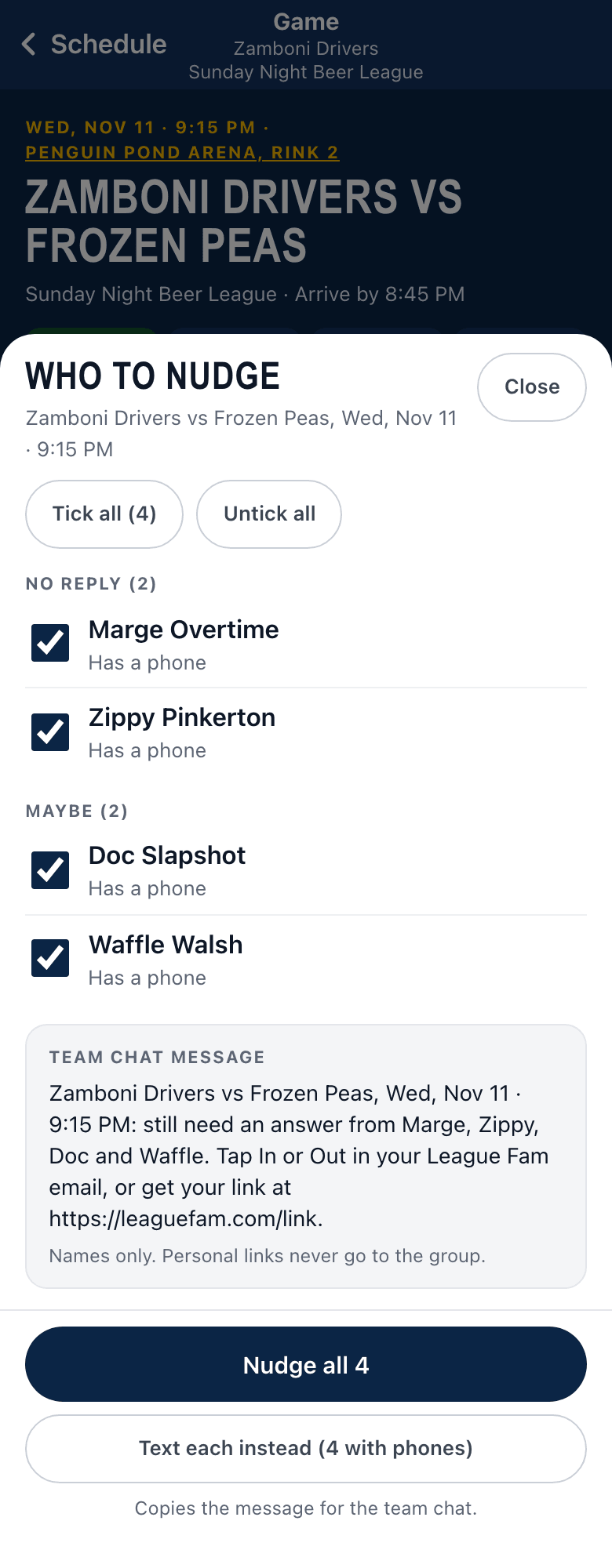
- A list opens. It shows people who have not replied, said Maybe, or need to confirm after a game moved. Everyone starts ticked. Use Untick all, or untick just the ones you do not want.
- Send it:
- One person ticked, and they have a phone number: tap Text with their name. Your messages app opens with a text to them. It includes their own link to answer.
- Several people ticked: tap Nudge with the number, or Nudge all. Your phone’s share sheet opens so you can drop one message in your team chat. (On a computer it copies the message instead, and you paste it.)
- Want to text each person instead? Tap Text each. You get one Text button per person with a phone.
- If nobody is ticked, the button is greyed out and says Tick someone to nudge.
Good to know
Section titled “Good to know”- Personal links never go to the whole group. Each person’s link is a private way in, so it is only ever sent in a text to that one person.
- You see “Opened”, not “Sent”. League Fam cannot tell whether you pressed Send in your messages app.
- Only managers see this button. Players do not.
- Someone without a phone number shows Nudge in the team chat, and a prompt to add their number.