Read the lineup
Video coming soonReading who is coming to a game
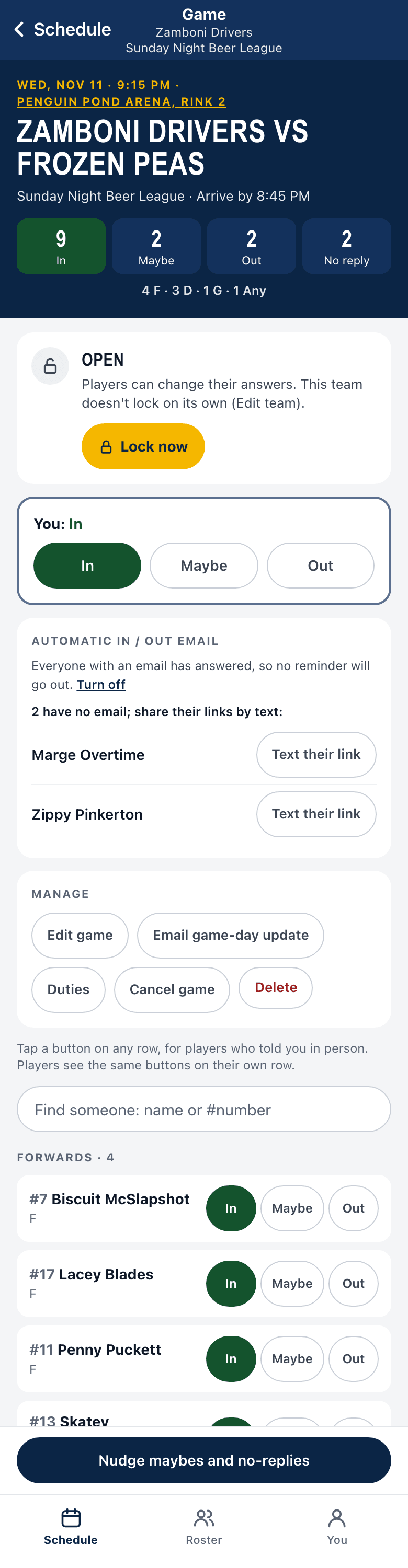
The game page is your lineup. It answers one question: who is playing?
- Open your team and tap a game on the Schedule.
- At the top, four counts (managers see these): In, Maybe, Out and No reply. Tap a count to jump to that group.
- Scroll down. People who are In are grouped by position. Below them are separate groups for Maybe, Out and No reply, so someone who has not said yes never looks like they are playing.
- If your sport needs a goalie and you have none, the page says so, and you can use the goalie finder.
Change someone’s answer
Section titled “Change someone’s answer”As a manager you can answer for anyone. Find their row and tap In, Maybe or Out. It shows at once. If it does not save (bad signal), it goes back and says so.
Long list?
Section titled “Long list?”Once you have more than 8 people, a search box appears. Type a name, nickname or number.
Good to know
Section titled “Good to know”- Managers also see the counts on each game in the Schedule, so you can scan ahead.
- The page refreshes itself every 20 seconds while it is open, so it stays current.
- Players see their own answer, and can answer for themselves. They cannot change other people’s.
- If a game is moved, people who already said yes are asked “still in?”
Set up reminder emails, so you have fewer people to nudge.